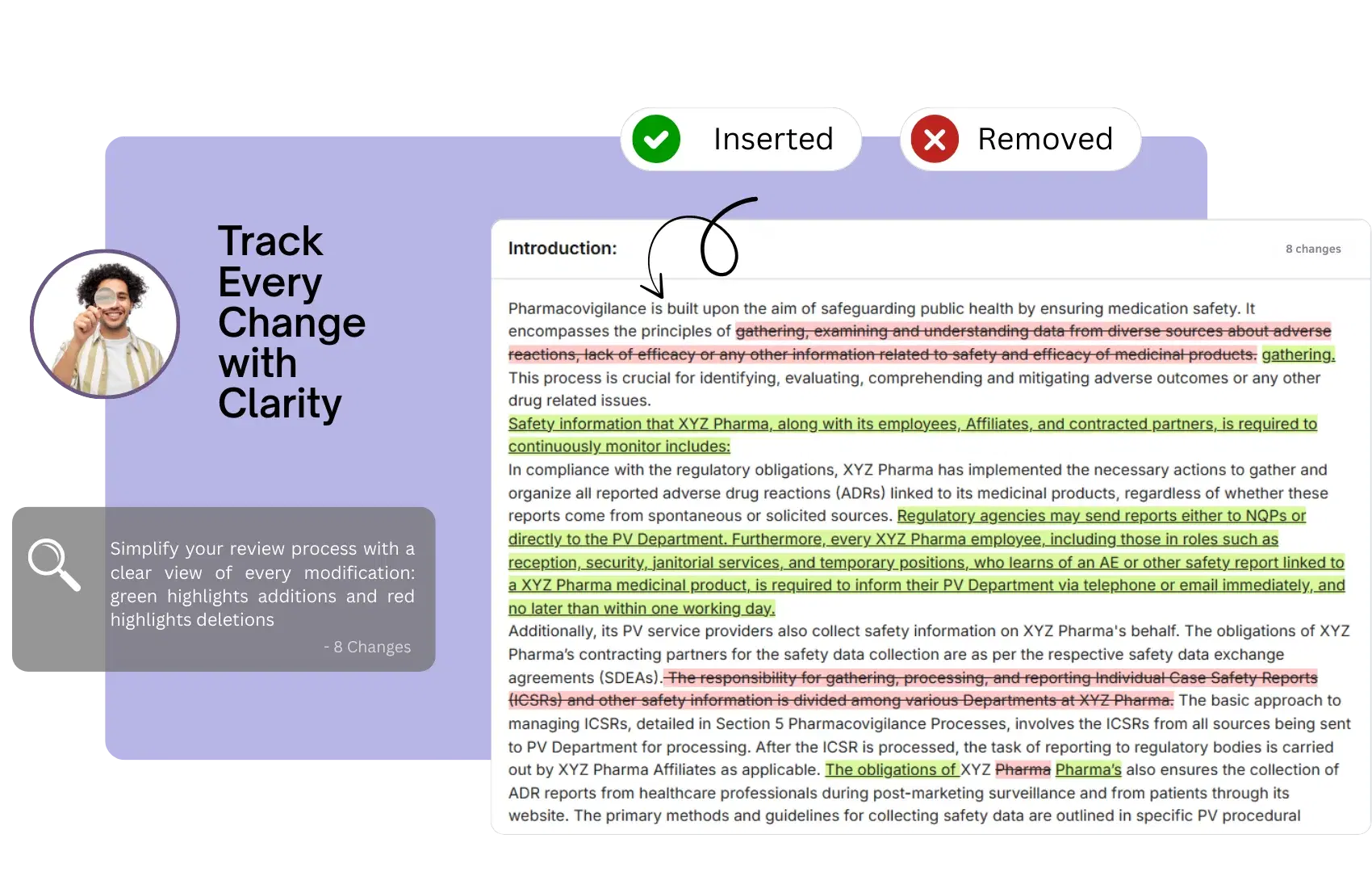
Reviewing PSMF updates can be overwhelming when changes are scattered across multiple sections and annexes. Traditional review processes require stakeholders to manually compare documents, track modifications, and verify that all updates align with regulatory requirements—a process that is both time-consuming and prone to oversight. For Quality Assurance teams, QPPV reviewers, and regulatory affairs professionals, identifying exactly what changed in a PSMF update is critical for efficient review and approval workflows. Missing a single critical change during review can lead to compliance gaps and regulatory findings.
The Review Challenge
Manual Comparisons
Reviewers waste hours comparing old and new versions manually to identify what has changed.
Hidden Changes
Critical updates can be easily missed when scattered across lengthy documents without clear highlighting.
Extended Review Cycles
Unclear change documentation leads to back-and-forth communications, delaying approvals and updates.
How Tracked Changes Streamline Reviews
Visual Change Highlighting
All modifications are clearly marked with color-coded highlighting, making updates instantly visible.
Change Summaries
Automated change logs provide quick summaries of all modifications made in each section.
User Attribution
See who made each change and when, with complete accountability for every modification.
Comment & Feedback
Reviewers can add comments directly on changes, streamlining the feedback and approval process.
Benefits for Review Teams
Faster Reviews
Reduce review time by up to 70% with instant visibility into all PSMF changes.
Improved Accuracy
Ensure no critical changes are missed with comprehensive change tracking and highlighting.
Audit Trail Compliance
Automated audit trails document the complete review and approval process for regulatory inspections.
FAQs
Frequently Asked Questions
Why do PSMF reviews fail in manual workflows?+
Manual review usually means comparing long documents by eye, tracking edits across multiple files, and relying on email to resolve comments. That makes it easy to miss important updates, especially when changes are spread across sections and annexes.
How does Track Changes improve PSMF review accuracy?+
PSMF Manager visually highlights edits, summarizes the affected content, and shows exactly who made each change. That gives reviewers a clear view of what has actually changed instead of forcing them to hunt through full documents manually.
How does this reduce review cycle time?+
Because reviewers no longer need to perform manual comparisons between old and new files. The system makes updates instantly visible, which reduces back-and-forth and helps teams review PSMF changes faster without losing control.
Can the system show changes at section and annex level?+
Yes. Reviewers can see changes in the context of the affected section or annex, which is important when one update has downstream impact elsewhere in the PSMF. This makes PSMF change tracking much more reliable than generic document redlining.
What happens when a reviewer rejects a change?+
The reviewer can send the change back with feedback, and the system preserves the full revision loop. That means the rationale for the rejection, the revised submission, and the final approval path all remain traceable.
How does user attribution help in inspections?+
It shows who proposed the change, who reviewed it, and who approved it. For inspectors, that creates a visible governance trail that supports the credibility of the review process and QPPV oversight.
Can multiple contributors work in the system without creating version chaos?+
Yes. PSMF Manager supports controlled collaboration so multiple SMEs can work in parallel without creating separate competing files. That is especially useful when updates involve regulatory, quality, safety, and affiliate teams at the same time.
How does this support audit-trail-backed review?+
Every proposed change, comment, approval, and review action is tied into the system record. That means the review process itself is traceable, not just the final published PSMF.
Can review workflows be risk-based?+
Yes. High-impact changes can be routed through more controlled approval paths, while lower-risk updates can follow lighter workflows. That helps the system match the real compliance importance of the change rather than treating every edit the same way.
Why is Track Changes important for inspection readiness?+
Because inspectors do not only care about the final document. They care whether there is evidence that changes were reviewed properly, that no important update was missed, and that the process is controlled. This capability makes that evidence visible.
Ready to streamline your PSMF operations?
Discover how PSMF Manager can transform your compliance workflows and enhance audit readiness.
Request a Demo