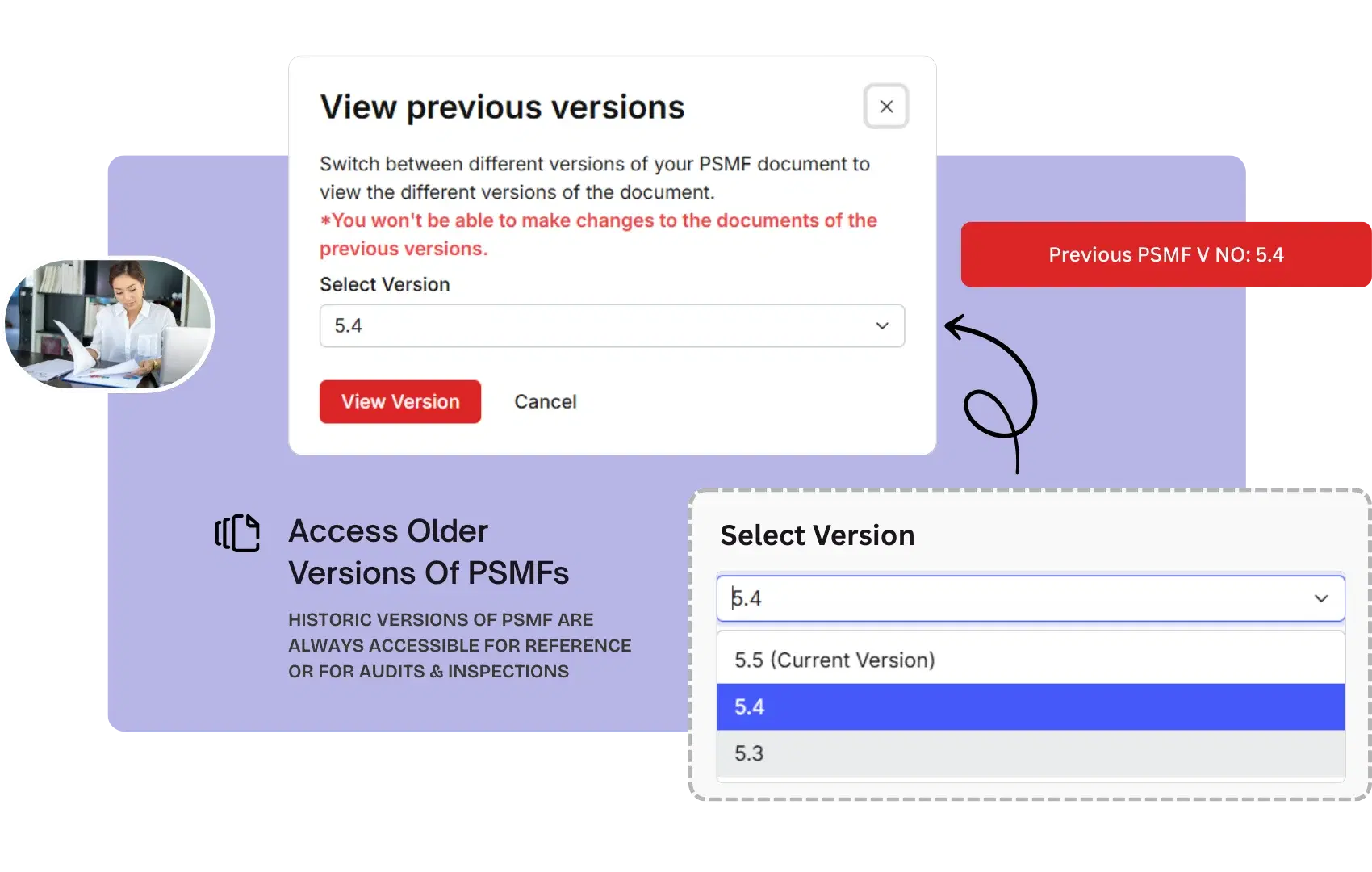
During regulatory inspections and audits, one of the most critical questions is: 'Can you show me the PSMF version that was active on a specific date?' Without a robust version history system, retrieving historical PSMF versions becomes a time-consuming challenge, often involving manual searches through archived files and backup drives. Regulatory compliance requires organizations to maintain complete documentation of all PSMF changes over time. This includes not just the current version, but all previous iterations with clear timestamps, change logs, and accountability for every modification made.
Challenges Without Proper Version Control
Lost Historical Records
Manual archiving systems risk losing previous PSMF versions, making it impossible to demonstrate historical compliance.
Audit Delays
Searching for specific historical versions during inspections wastes valuable time and creates unnecessary stress.
Lack of Traceability
Without automated logging, it's difficult to track who made changes, when they were made, and why they were necessary.
How PSMF Manager Maintains Complete Version History
Automated Version Archiving
Every PSMF update is automatically saved as a new version with complete historical preservation.
Time-Stamped Records
All versions are securely logged with precise timestamps, user details, and change descriptions.
Instant Retrieval
Access any historical PSMF version within seconds through an intuitive version browser interface.
Compare Versions
Side-by-side comparison tools highlight exactly what changed between any two PSMF versions.
Benefits of Complete Version History
Inspection-Ready
Confidently respond to auditor requests for historical PSMF versions with instant access.
Full Accountability
Complete audit trails demonstrate who made changes, when, and for what reason.
Regulatory Compliance
Meet all regulatory requirements for PSMF documentation and historical record-keeping.
FAQs
Frequently Asked Questions
Why is version history critical in PSMF management?+
During inspections, one of the most important questions is often: 'Can you show the PSMF version that was active on a specific date?' Without a structured version history, teams are forced into manual archive searches that waste time and weaken confidence. PSMF Manager preserves every approved version so historical compliance can be demonstrated immediately.
What does the audit trail actually capture?+
The audit trail records the user, timestamp, action taken, and the nature of the change. In practice, that means you can see who changed which section, when it changed, and whether the update was part of a review, approval, or published version. That level of traceability is essential for audit-ready PSMF management software.
How does version history support inspection readiness?+
It allows teams to retrieve any historical PSMF version in seconds, compare it against later versions, and show the exact state of the pharmacovigilance system at a given point in time. That is especially important for inspections tied to historical events, CAPAs, or questions about when a change was actually reflected in the PSMF.
What happens if records are managed manually instead?+
Manual archiving creates three common problems: lost historical records, audit delays, and lack of traceability. These are not small efficiency issues. They directly affect whether a company can prove continuous control over its PSMF during an inspection.
Can auditors retrieve previous PSMF versions directly from the system?+
Yes. Historical versions are stored in a structured archive and can be retrieved through the version browser rather than through manual backup searches. This lets inspection teams answer date-specific questions quickly and with more confidence.
Can users compare two PSMF versions side by side?+
Yes. PSMF Manager supports side-by-side version comparison so reviewers and inspectors can see exactly what changed between two approved states. This is important when investigating whether a system change, Annex I update, or QPPV-related revision was captured on time.
How does the system support Annex I and change-log expectations?+
The system records approved changes in a structured way so that the change history is not reconstructed manually later. That supports the logic behind Annex I and strengthens the broader PSMF inspection readiness story because the file always carries a defensible history of controlled updates.
Does version history also improve accountability?+
Yes. Because each version is time-stamped and linked to named user actions, the system makes it easier to demonstrate who made a change, who approved it, and when it became part of the active PSMF. That creates full accountability across authors, reviewers, and QPPV oversight.
How does this reduce stress during audits?+
It removes the scramble. Instead of searching archived drives or piecing together old files, inspection teams can retrieve the required version instantly, along with its timestamps and change context. That saves time and makes the inspection response much more controlled.
Why is this more than just document version control?+
Because this is not just about storing files. It is about proving that the PSMF remained controlled, attributable, and historically accurate over time. In other words, it supports pharmacovigilance compliance software expectations, not just file management.
Ready to streamline your PSMF operations?
Discover how PSMF Manager can transform your compliance workflows and enhance audit readiness.
Request a Demo