AI simplifies Change Reviews and Annex I maintenance

AI simplifies Change Reviews and Annex I maintenance

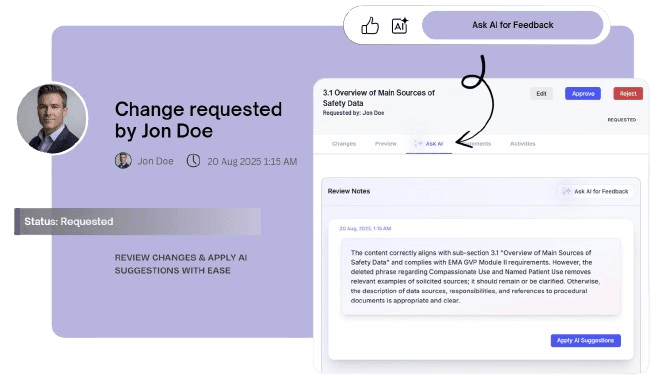
Leverage AI to accelerate change management within PSMF, saving valuable time by automating the management of the Change Log for Annex I and providing key review comments for changes made in the PSMF. AI enables auto-generation of Change Log entries for Annex I in a change request. AI assists during change review by critiquing edits, checking accuracy and confirming coherence of files and data.

How to confirm if Changes are acceptable

Is the change accurate?

Users can use AI to identify factual mistakes, unsupported files/statements, or questionable assumptions in a suggested update

Does it match the section data?

AI can compare the proposed change language against the source text to highlight mismatches, omissions, or irrelevant additions.

Does it follow guidelines (EMA GVP Module II)?

Users can check whether the change stays aligned with the applicable regulatory proposed structure, intent, and wording expectations.

How AI supports the change review workflow

Critique suggested changes

AI gives a clear review of what edits look good, need correction, require follow-up edits, or if there are any mistaken additions/deletions.

Validate structure and scope

AI flags if proposed changes in text or attachments drift from expected scope, if a module reference is missed, or if the update holds value.

Speed up further edits

By summarizing concerns and corroborating alignment, AI can update section text with suggested edits, instilling more confidence in users.

Check factual consistency

Potential factual changes are surfaced so reviewers can quickly confirm whether the update is grounded in the actual source content.

How does AI support Annex I

AI proposes Change Log entries

Users can use AI to auto-suggest text for the fields to be captured in the Change Log (Annex I) at the time of change request creation.

AI updates Change Log with edits

AI can compare the changes updated in text or attachments against the source edits to revise the entries in Annex I (Change Log) fields.

AI enters data in all Change Log fields

AI proposes language entries for changes which barely needs to be reviewed or edited further to be logged as the Annex I entry.

FAQs

Frequently Asked Questions

What is AI designed to do in PSMF Manager?+

AI assists in change management in two ways: 1. Review support: It helps reviewers evaluate proposed PSMF updates before approval by checking whether the change in text and/or attachment appears factually sound, whether it still matches the source section data, and whether it remains aligned with relevant regulatory expectations like EMA GVP Module II. It also summarizes what is acceptable, what needs correction, and what needs follow-up, which reduces the time spent decoding edits manually. 2. Change Log support: It helps auto-generate text entries for Change Logs (Annex I) for every change in a matter of seconds. This is otherwise extremely time-intensive to capture manually, especially when the summary is prepared late during PSMF finalization. AI can gather data from within the system and produce a concise summary of the edits made.

Does AI replace QPPV or reviewer judgment?+

No. AI is mainly a support layer within PSMF Manager, it is not an approval engine claiming to replace any executive roles. Final responsibility for deciding whether a suggested edit or comment is to be accepted, ignored or rejected remains with the human Users of the organization using PSMF Manager.

Can AI be optional to be used by an organization?+

Yes. One of its core features is that AI use can be switched on or off anytime by the Admin of the organization. If it is switched on, it can be used for change reviews and change log (Annex I) suggestions and if it is switched off, the option will not appear for AI to be used during the change management workflow.

How does AI support regulatory expectations consistency?+

AI helps Users to check whether a proposed update still fits the structure, scope, and wording expectations of the relevant section. Prior knowledge of regulatory intelligence enables AI to check and suggest comments in case the changes are not aligned in coherence with regulatory expectations. That makes it especially useful for reviewing content that may sound correct but is not fully aligned with how the PSMF should be framed for that geographical region, based on local regulations to be followed.

What kinds of issues can AI flag for changes?+

It can flag factual inconsistencies, missing required context, scope drift, irrelevant additions, grammatical errors, or wording that no longer matches the underlying section logic. That makes AI-assisted PSMF review for changes extremely useful as a first-pass quality check. Where annex-linked logic is affected by the change, if a proposed revision creates a mismatch between the section wording and its supporting annex logic, AI helps surface that issue for User.

What is the real value of AI for inspection readiness?+

AI helps improve internal consistency before content is approved into the live PSMF. That means fewer weak edits, fewer avoidable mismatches, and a stronger final document when the system is tested under inspection. Additionally, the entries in Annex I (Change Log) have always historically been under intense scrutiny during the inspections, thus warranting an automated mechanism to ensure that all the edits made are accurately and contemporaneously logged with every approved change into Annex I.

Why is AI in PSMF Manager safer than generic AI content generation?+

Because the intended use of the AI feature in PSMF Manager is not open-ended drafting, it is focused to provide support inside a controlled PSMF workflow, with human decision-making retained at the end of each of the processes. This ensures the AI feature is aligned with regulatory expectations and GxP caution, as all AI inputs are logged and maintained as audit trails to denote subsequent human intervention when it comes to finalizing the changes or for decision making.

Ready to streamline your PSMF operations?

Discover how PSMF Manager can transform your compliance workflows and enhance audit readiness.

Request a Demo