
PSMF Generation Is a Control Problem, Not Just a Publishing Task
PSMF generation often becomes stressful when teams treat it as a final publishing task. The request arrives, files are pulled from different folders, annexes are checked manually, formatting is reviewed again, and the team tries to confirm whether the final document reflects the current pharmacovigilance system.
That is not a generation problem alone. It is a control problem.
Under EMA GVP Module II, the PSMF should be accurate, kept up to date, and reflect the pharmacovigilance system in place. EMA also states that the PSMF should be permanently available for inspection and provided within 7 days when requested by competent authorities.
This is why automated PSMF generation is valuable only when it is connected to controlled content, current annexes, version history, change logs, and approval workflows. A faster PDF is useful. A quick-generated final PSMF backed by traceable, approved, inspection-ready data is stronger.
Why Manual PSMF Generation Creates Risk
Manual PSMF generation usually depends on scattered inputs. Sections may sit in Word documents, annexes may be tracked in spreadsheets, source updates may arrive by email, and historical versions may be stored in shared drives.
This creates risk mainly in five areas:
| Manual Generation Issue | Why It Creates Risk |
|---|---|
| Scattered source files | Teams may miss the latest approved input |
| Separate annex trackers | Annexes may not match the core narrative |
| Manual formatting | Final PDFs may have broken structure or inconsistent output |
| Weak version control | Historical PSMF states become difficult to prove |
| Late Change Log updates | Annex I may not show continuous system control |
The biggest issue is not simply time. It is whether the generated PSMF can prove that the pharmacovigilance system was controlled before the request arrived.
Industry commentary on PSMF inspection readiness has highlighted that avoidable inspection concerns often arise from annex-level weaknesses, including unclear agreements, missing safety data source contacts, inadequate audit planning, and system changes not captured in the logbook. These issues typically point to governance gaps, not just missing content.

Why 2026 Raises the Bar for PSMF Control
PSMF automation is also becoming more important because regulatory expectations are moving toward clearer system governance and stronger oversight of outsourced PV activities.
Commission Implementing Regulation (EU) 2025/1466 amends Implementing Regulation (EU) No 520/2012 and applies from February 2026. The regulation clarifies that major or critical deviations from pharmacovigilance procedures, their impact, and their management must be documented in the PSMF until resolved. It also strengthens expectations around subcontracted pharmacovigilance activities, including clear roles, responsibilities, safety data exchange, audit arrangements, inspection arrangements, and written consent before further subcontracting.
For PSMF teams, this means automation should not only help generate documents faster. It should help maintain clearer evidence of:
- Significant deviations and their status
- Subcontractor and vendor oversight
- Audit and inspection arrangements
- Change history
- QPPV visibility
- Current system control
For companies managing UK-authorized products, the Windsor Framework changes implemented from 1 January 2025 also added complexity around UK pharmacovigilance obligations. UK guidance confirms that QPPV and PSMF obligations apply to UK marketing authorizations, including Category 1 and Category 2 products.
This does not mean every PSMF workflow needs to become a regional regulatory guide. But it does show why global and local PSMF control matters. Regional requirements can change, and manual coordination makes it harder to keep global narratives, local annexes, product scope, and reporting expectations aligned.
What Automated PSMF Generation Should Actually Do
Automated PSMF generation should not mean simply clicking "export to PDF."
A strong generation workflow should:
- Compile the latest approved PSMF sections
- Include current annexes
- Maintain consistent formatting and structure
- Include table of contents and bookmarks
- Connect Annex I Change Log information
- Preserve version and approval context
- Support review before final publication
- Support QPPV visibility before release
PSMF Generation supports this by compiling updated information into a formatted PDF based on preset templates. The generated output includes section and annex structure, bookmarks, and Annex I Change Log information.
This matters because automated generation should reduce the burden of document assembly without weakening review control.
Why Source Data, Version History, and Audit Trails Matter Before Generation
A generated PSMF is only as reliable as the content behind it. If product lists, SOP references, vendor details, audit records, or affiliate inputs are outdated, automation will only produce a cleaner version of an inaccurate file.
Before generation, source updates should move through review, version history should preserve previous PSMF states, and tracked changes should show what changed, who changed it, and how it was approved with corresponding audit trails.
This helps teams generate the PSMF from content that is current, approved, and traceable.
Where Annex I Fits into Automated Generation
Annex I should not be treated as a clean-up step after PSMF generation.
It is the chronological proof of system control. If changes are made to the PSMF but the Change Log is updated late, teams may need to reconstruct the history manually. That weakens the inspection story because the final document may look complete, but the change trail may not show continuous control.
Automated generation should include approved Change Log information so the final PSMF output carries the right version and change context since revision.
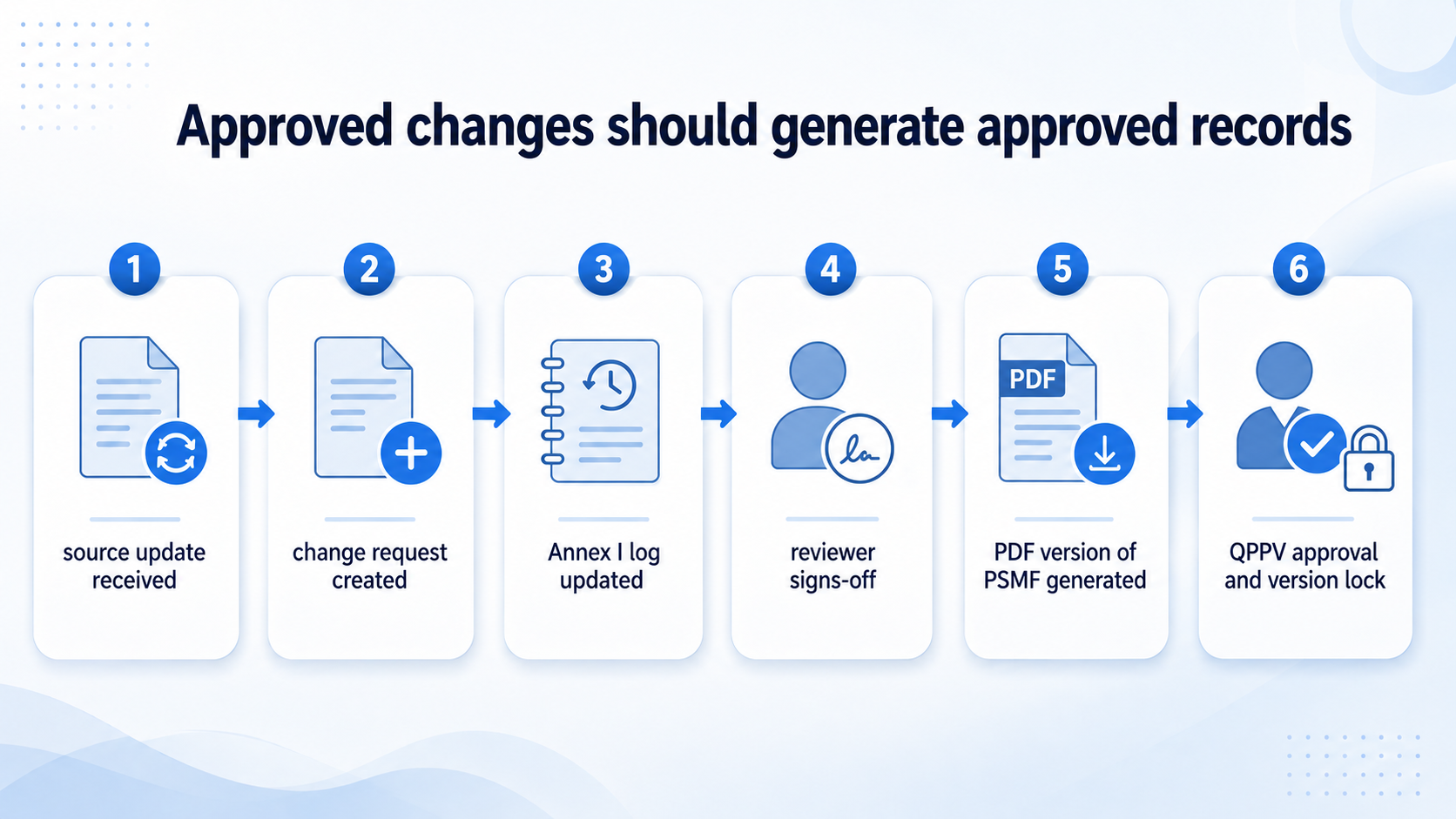
For stronger oversight, Annex I updates should be event-driven. When a source change, agreement update, affiliate update, or system change affects the PSMF, the related Change Log entry should move through review with the change itself. This makes Annex I part of the workflow, not a separate task at the end.
A Practical PSMF Generation Workflow
Automated PSMF generation should follow a controlled document lifecycle, not a last-minute export process. The strongest workflow is one where the PSMF moves from draft unlock to final approval lock through clear, traceable stages.
| Workflow Stage | What Happens | Generation Control |
|---|---|---|
| 1. Initiate | A new PSMF revision is unlocked by the Admin or Coordinator. | The document enters a controlled draft state before any updates are made. |
| 2. Edit | Authorized users update the relevant sections, annexes, and linked information. | Changes are made inside the platform with role-based access instead of scattered offline edits. |
| 3. Review | Reviewers check the revised content, annex alignment, and supporting update context. | The team can confirm whether the draft reflects the current pharmacovigilance system before output generation. |
| 4. Draft | A draft version of the PSMF is generated for internal checks. | Structure, formatting, annex placement, bookmarks, and Change Log inclusion can be verified before final release. |
| 5. Approve | The required Approver or QPPV approval is recorded. | Approval becomes part of the documented workflow instead of remaining in emails or separate trackers. |
| 6. Lock | The approved version is locked with version history and audit trail records. | The final PSMF is protected from uncontrolled changes and can be retrieved when required. |
This approach shifts PSMF generation from a document assembly task to a controlled lifecycle. Each revision is opened, edited, reviewed, generated, approved, and locked in sequence.
That matters because inspection readiness depends on more than the final PDF. Teams also need to show how the content was updated, reviewed, approved, and preserved. When generation follows a structured lifecycle, the final PSMF is not just formatted correctly. It is backed by version history, audit trails, approval records, and controlled access.
The result is a generation process that supports both speed and compliance. PV teams can produce the required PSMF output faster while maintaining the evidence needed to show that the document reflects the current pharmacovigilance system.
What This Means for QPPV, QA, and PV Operations
Automated PSMF generation is not only useful for the person creating the PDF. It supports different stakeholders in different ways.
For the QPPV, automation supports visibility into current content, version history, pending changes, major or critical deviations, and approval status.
For QA and compliance teams, automation supports audit trails, documented approvals, version history, and stronger evidence of controlled processes.
For PV operations, automation reduces manual coordination, repeated formatting work, version confusion, and last-minute follow-ups.
For IT and validation teams, automation should sit inside a validated, access-controlled, traceable software environment. This is why features such as role-based access, audit trails, secure storage, documented configuration, and validation support matter.
Automation does not remove accountability. It makes accountability easier to demonstrate.
How PSMF Manager Supports Automated PSMF Generation
PSMF Manager supports automated generation by connecting the final output to controlled PSMF management workflows.
- PSMF Generation helps teams generate structured PSMF PDFs in a single click from updated content, with section and annex formatting, bookmarks, and Annex I Change Log information.
- Version History supports historical retrieval and time-stamped accountability.
- Tracked Changes helps reviewers see what changed, who made the change, and how the review moved forward.
- External Data Sources helps source updates move into a controlled review process instead of relying on manual monitoring.
- Global and Local PSMFs supports central and affiliate PSMF alignment, which is especially important when regional requirements differ.
The platform's Compliance and Security positioning also supports regulated use through security controls, audit trails, role-based access, and alignment with global standards such as EMA GVP Module II, US FDA 21 CFR Part 11, EU GMP Annex 11, and GAMP 5, in addition to local regulations where applicable.
Stay Ready Before the Request Arrives
Automated PSMF generation should help PV teams avoid the last-minute scramble.
The strongest approach is to keep the PSMF current throughout the year, maintain annexes in line with approved changes, preserve version history, and generate the final document from a controlled system.
A one-click PSMF is useful only when the content behind it is accurate, current, approved, and traceable.
As expectations around significant deviations, subcontractor oversight, global-local alignment, and inspection readiness continue to increase, the PSMF needs to work as a controlled system, not a document assembled under pressure.
See how PSMF Manager helps PV teams generate audit-ready and inspection-ready PSMF documents from controlled content, version history, and approved workflows. Request a demo