
The Version Nobody Can Confirm
An inspection request arrives for one of your clients.
The content exists, but the team cannot confirm which version is approved. One file is stored in SharePoint, another is attached to an email, and the latest QPPV comments have not been incorporated into either.
The problem is not the team's pharmacovigilance knowledge.
It is the operating model supporting the service.
A PSMF can be created and maintained using documents, spreadsheets, shared folders, and email approvals. For a limited client portfolio, that model may remain practical.
The question is whether it can remain controlled when the provider adds more MAHs, products, contributors, local files, source systems, and inspection timelines.
Key Takeaways: Manual PSMF management can remain effective for a limited and stable client portfolio. A software platform becomes more valuable when version control, client separation, global and local dependencies, source changes, and QPPV reviews become difficult to manage consistently. The strongest model often combines controlled software workflows with PV professional judgement.
The Decision Is Not Simply Manual Versus Digital
GVP Module II permits the PSMF to be maintained electronically, provided the content remains legible, complete, accessible, current, and fully traceable. It also allows PSMF maintenance activities to be delegated, while the MAH retains ultimate responsibility for the pharmacovigilance system, the file's maintenance, and its provision to competent authorities.
This means that neither model is automatically compliant.
A manual process may be well controlled. A software platform may be poorly configured or inconsistently used.
The real comparison is between two operating models:
- One depends heavily on folders, trackers, email approvals, and individual coordination.
- The other uses a structured system to control access, reviews, changes, versions, and document generation.
Manual and Platform-Led PSMF Delivery Compared
| Control Area | Manual Service Model | Platform-Led Model |
|---|---|---|
| Approved version | Identified through naming rules, folders, and trackers | The approved version is maintained within the controlled workflow |
| Review process | Reviewers compare documents and consolidate comments manually | Changes, comments, attribution, and approvals remain connected |
| Client separation | Depends on repository permissions and user discipline | Access can be assigned according to roles and client responsibilities |
| Annex updates | Information is requested and inserted manually | Source changes can enter a structured impact-assessment process |
| PSMF generation | Sections and annexes are compiled, formatted, and checked manually | Approved content can be compiled through a controlled publishing process |
When Manual PSMF Services Still Make Sense
Manual PSMF management may remain proportionate when the provider has:
- A small and stable client portfolio
- Limited contributor and reviewer groups
- Predictable update volumes
- One controlled document repository
- Clearly assigned review and approval responsibilities
- Strong internal checks for version and change history
- Few global-to-local dependencies
In this setting, the provider can maintain client-specific flexibility without introducing unnecessary technology.
The risk begins when exceptions become part of the normal process.
One client uses a separate approval tracker. Another maintains a local annex outside the main repository. A vendor sends performance data by email. The QPPV records comments in a different document. A regulatory update affects several clients, but each PSMF is reviewed independently.
No single workaround appears serious. Together, they create a process that becomes difficult to explain, audit, and reproduce.
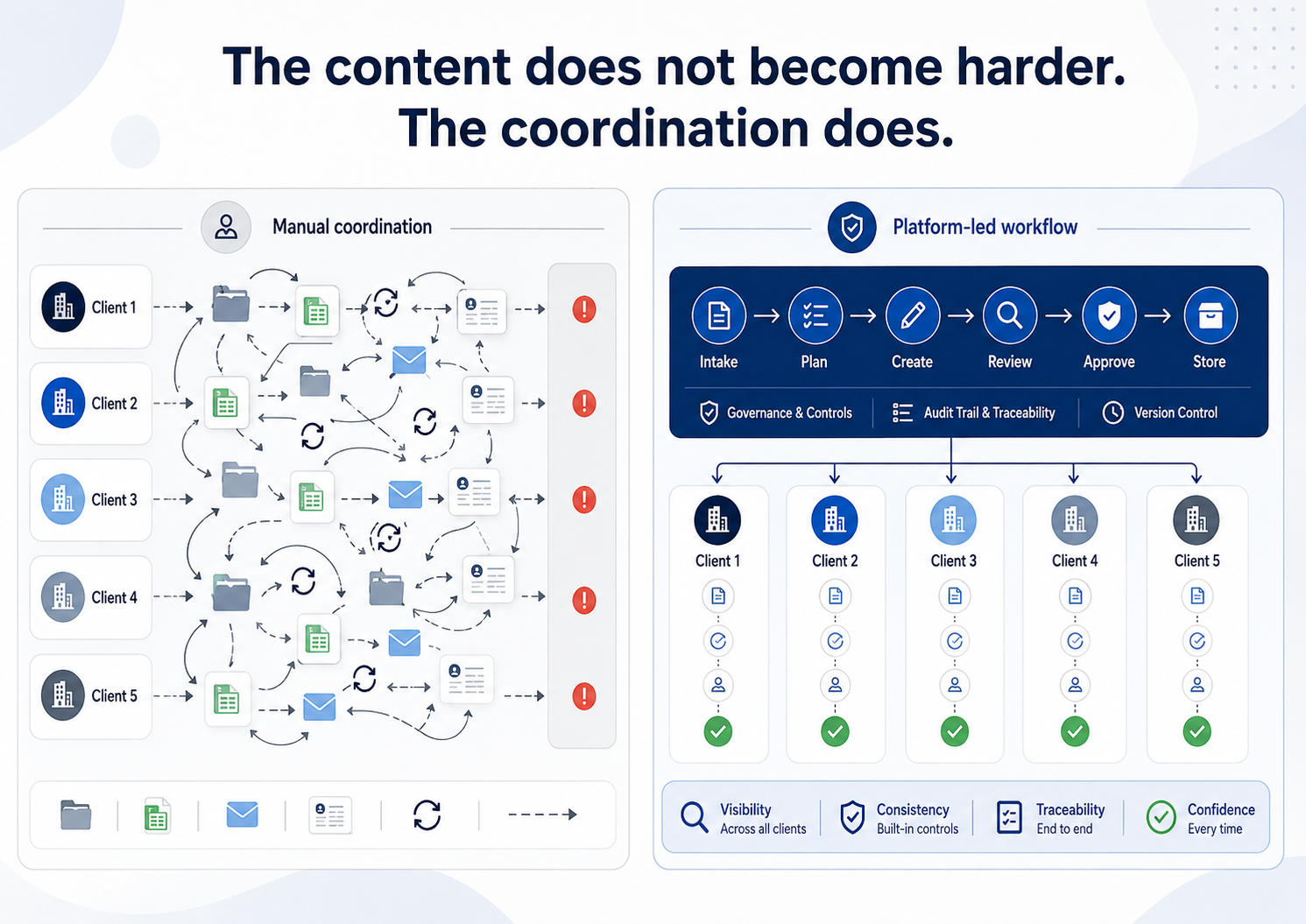
Manual Operations Scale With Relationships, Not Documents
Every additional client introduces more than one PSMF.
It may also add:
- A separate product portfolio
- Different safety-data sources
- New contractual arrangements
- Additional contributors and reviewers
- Distinct SOP references
- Client-specific audits and CAPAs
- Local PSMF requirements
- Independent inspection schedules
The administrative burden grows through the number of connections between those elements.
This is especially visible in frequently changing annex information. Annex F may require updated system-performance information. Annex G may need current audit and CAPA records. Annex H must remain aligned with the applicable product portfolio.
Under a manual model, every update can create another request, reminder, comparison, review cycle, and approval record.
That increases coordination effort with every additional client, contributor, source system, and approval path. Adding clients often means adding more document-control hours, even when the provider's underlying regulatory approach remains the same.
A platform does not remove the work. It can prevent the same control activity from being rebuilt separately for every client.
What PSMF Software Should Actually Solve
A PSMF platform should do more than store documents or create PDFs.
It should help the provider answer:
- Which version is currently approved?
- What changed from the previous version?
- Who proposed, reviewed, and approved the update?
- Which client, product, territory, section, or annex is affected?
- What source information triggered the change?
- Can the previous approved state still be retrieved?
- Can users see only the records relevant to their responsibilities?
- Can the current PSMF be generated without rebuilding it during an inspection?
These are lifecycle controls.
A platform that cannot answer them may simply move a manual process into a different interface.
Software Does Not Remove Client-Specific Judgement
A service provider should not be forced to describe every client's pharmacovigilance system in exactly the same way.
Templates and workflows can be standardised. The underlying content cannot always be.
Each client may have different:
- Organisational responsibilities
- Products and territories
- Vendor arrangements
- Safety-data sources
- Computerised systems
- Local requirements
- QPPV oversight structures
The software should control how information is collected, reviewed, approved, and retained without replacing the professional judgement needed to describe the system accurately.
This is why the strongest model is often hybrid.
Software controls the workflow. It manages access, notifications, change visibility, review routing, historical versions, and document generation.
PV professionals control the judgement. They decide whether the source information is accurate, whether a change affects the PSMF, how the system should be described, and whether the content is ready for approval.
Validation and Security Belong in the Buying Decision
A software platform introduces controls, but it also introduces implementation responsibilities.
The provider should define the system's intended use, assess the supplier, test configured workflows, verify user permissions, document acceptance criteria, and manage future changes through its quality system.
A purchased platform does not eliminate the need for validation or assurance. It may reduce the burden of building and maintaining the underlying software, but the service provider must still confirm that its own configuration and workflows operate as intended.
Client separation requires equal attention.
Before adoption, the provider should test whether:
- Client users can access only authorised information
- Internal teams receive permissions based on assigned responsibilities
- Reviewers cannot approve their own changes where segregation is required
- Historical records remain protected
- Access changes are traceable
- One client's data cannot appear in another client's output
PSMF Manager describes role-based access, audit trails, version control, data protection, and controls aligned with GAMP 5 and EU GMP Annex 11 on its Compliance and Security page. The provider should assess these capabilities against its own intended use and quality requirements.
A Practical Decision Test
Remaining manual may still be reasonable when all of the following are true:
- Approved files can be retrieved immediately.
- Reviewers can identify changes without comparing several documents.
- Every annex update is linked to its source and approval.
- Client access is consistently controlled.
- Historical versions are complete and available.
- Global changes are reliably assessed for local impact.
- The process continues to function when a key coordinator is unavailable.
A single weakness does not automatically justify a platform.
Several weaknesses indicate that the service depends on workarounds rather than a repeatable control model.
GVP Module II requires the current PSMF to be provided within seven days of a competent-authority request. Immediate access may also be required at the stated PSMF location or QPPV site.
The provider should therefore test the complete process before selecting a delivery model.
Choose one client at random and ask the team to produce:
- The current approved PSMF
- The previous approved version
- The latest change record
- Evidence of QPPV review
- Applicable source information
- The final inspection-ready PDF
The time and effort required will reveal more than a feature comparison.
How PSMF Manager Supports Platform-Enabled Services
PSMF Manager brings the PSMF lifecycle into one structured environment. Providers can begin with the complete feature overview and assess each capability against their client portfolio and operating model.
Its feature set includes:
Global and Local PSMF Management supports central oversight while allowing country-specific content and review. Global updates are flagged for relevant local files rather than silently replacing local information.
Version History and Audit Trails record user details, timestamps, actions, affected content, and the nature of updates while preserving previous approved versions.
Tracked Changes and Review Workflows highlight modifications, record user attribution, and keep comments and review activity connected to the proposed update.
External Data Sources can link with compatible systems and repositories through webhooks or open APIs, subject to the external system's configuration. Source changes can then enter a controlled review process.
PSMF Generation creates a read-only PDF from the latest approved content after the required sections and annexes have been updated and reviewed.
Ask AI supports change review and suggests wording for Annex I Change Log entries. The suggestions remain subject to human review, editing, acceptance, or rejection.
These capabilities do not replace the service provider's expertise or the MAH's responsibility. They provide a more consistent system for delivering PSMF services across multiple clients.
The Right Model Is the One That Remains Controlled
Manual PSMF services can work.
They become difficult to sustain when the provider can no longer demonstrate control without relying on a particular person, spreadsheet, inbox, or naming convention.
A software platform is justified when it solves a genuine governance and scalability problem, not simply because it creates a polished document.
The final question is not:
"Can we continue creating PSMFs manually?"
It is:
"Can our current operating model remain accessible, traceable, secure, and inspection-ready as the service grows?"
Request a demonstration of PSMF Manager to review how platform-enabled workflows can support PSMF delivery across a growing client portfolio.