
An inspector asks:
"Who changed Section 4 of your Pharmacovigilance System Master File last quarter, what changed and why?"
The team opens SharePoint version history. Version 43 shows who made the change and when, but the version comment is blank. There is no explanation of the update, linked review record or approval evidence.
SharePoint recorded that the file changed. It could not show why.
This is the core challenge with SharePoint PSMF management.
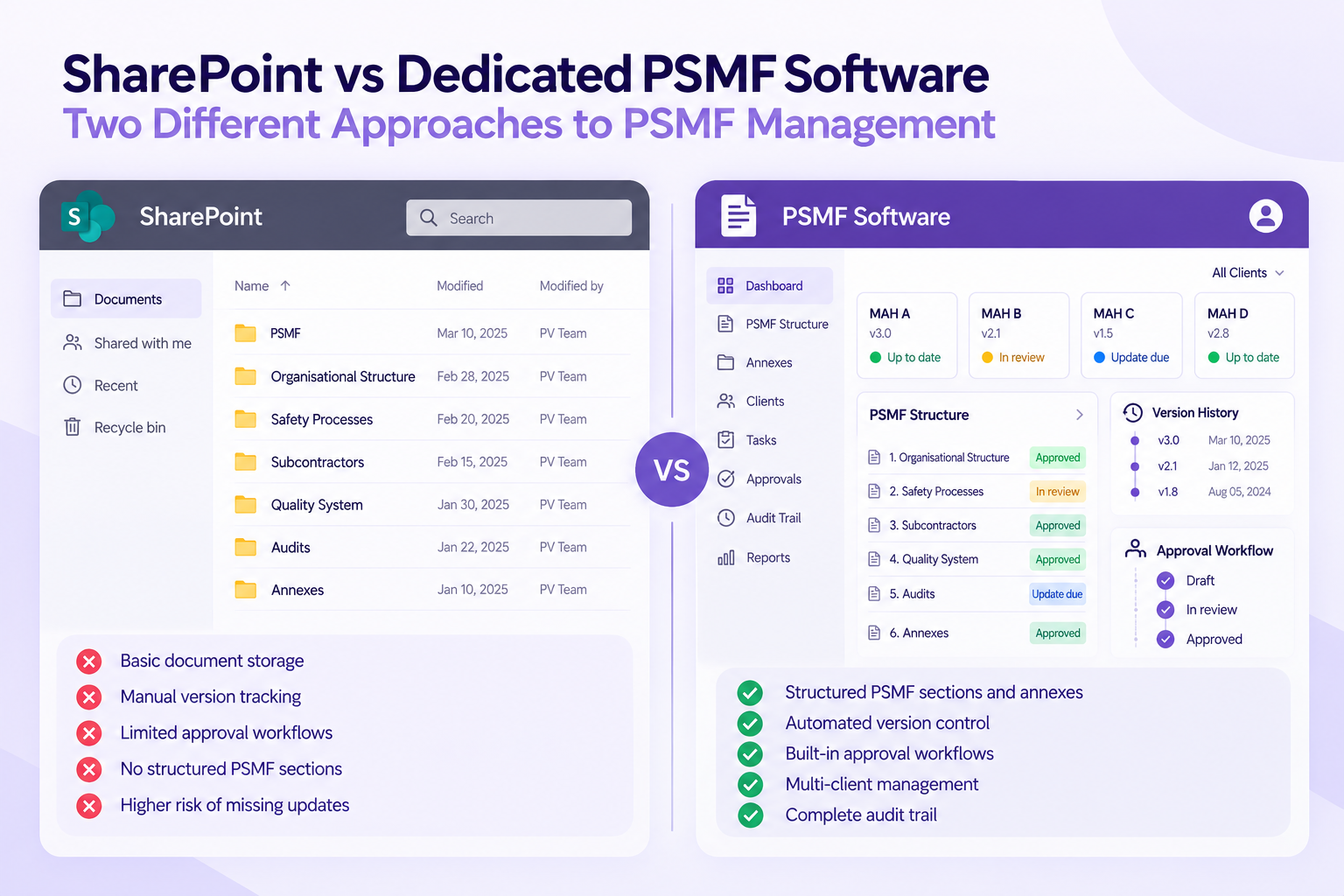
SharePoint can support document storage, versioning and access control. The question is whether the configured environment can demonstrate the level of control expected for a regulated pharmacovigilance record.
A PSMF is not simply a document. It is a controlled record of the pharmacovigilance system, its responsibilities and significant lifecycle changes.
The issue is not storage.
It is demonstrating control.
Key Takeaway: SharePoint can support PSMF management when appropriately configured, validated and maintained. The challenge is that PSMF-specific controls such as structured change tracking, approval workflows and lifecycle management require additional design, validation and ongoing ownership.
Why Do PV Teams Use SharePoint for PSMF Management?
SharePoint is often selected because organisations already use it for document management.
It provides:
- Document storage
- Access management
- Version history
- Collaboration tools
- IT support infrastructure
For some organisations managing a limited number of PSMFs, a well-designed SharePoint environment may be suitable.
The challenge begins when teams need to demonstrate that the system is fit for its intended use.
The PSMF is a regulated pharmacovigilance record under EMA GVP Module II. It must accurately describe the pharmacovigilance system and maintain information throughout its lifecycle.
A SharePoint library can hold the PSMF.
But PV teams must ask:
Can we demonstrate how information was changed, reviewed, approved and maintained over time?
What Are the 5 GxP Gaps in SharePoint PSMF Management?
1. Computerised System Validation for Intended Use
Risk prevented: Using a general platform without proving suitability for PSMF activities.
SharePoint's technical security does not automatically validate an organisation's specific PSMF configuration.
A PV team using SharePoint needs to assess and document:
- Site configuration
- Workflows
- User permissions
- Approval processes
- Change management procedures
Computerised system validation in PV requires demonstrating that the system performs as intended.
Regulatory approaches such as EU GMP Annex 11 and risk-based frameworks such as GAMP 5 emphasise that computerised systems should be controlled according to their intended use.
A dedicated PSMF system does not remove validation responsibility.
The organisation still needs to qualify the supplier and validate intended use.
However, purpose-built software can reduce the amount of custom configuration and workflow development required internally.
Inspector question: "Who validated this system configuration for PSMF management and how is ongoing control maintained?"
2. PSMF Audit Trail Depth and Data Integrity
Risk prevented: Knowing that a file changed but not understanding the change.
A standard SharePoint version history can show:
- Previous versions
- User identity
- Modification date
However, a PSMF audit trail may require additional context:
- What section changed
- Why it changed
- Who reviewed it
- Who approved it
Data integrity principles such as ALCOA+ focus on records being attributable, legible, contemporaneous, original, accurate, complete and consistent.
"Modified by" is not the same as "reason for change".
A dedicated PSMF solution can connect changes directly to controlled lifecycle activities.
Inspector question: "Can you show the reason for this PSMF change and the review history behind it?"
3. Controlled Approvals and Electronic Signatures
Risk prevented: Approval records that do not clearly demonstrate accountability.
A SharePoint approval workflow can show that an approval action occurred.
However, regulated approval processes need a clear connection between:
- The person approving
- The record approved
- The date and time
- The meaning of the approval
For organisations requiring electronic signatures, regulations such as 21 CFR Part 11 and EU GMP Annex 11 provide expectations around electronic records and signatures.
An approval button alone does not automatically create a compliant electronic signature process.
Inspector question: "Can you prove who approved this exact version and what their approval represented?"
4. PSMF Structure, Annexes and Logbook Management
Risk prevented: Separate files becoming inconsistent.
A PSMF is more than the main document.
It includes:
- Core PSMF sections
- Annexes
- Supporting records
- Change history
In SharePoint, these elements are often maintained as separate files.
The risk appears when changes need to flow across multiple locations.
For example:
- A new vendor affects agreements and annexes
- A QPPV change affects organisational information
- A product update affects multiple sections
EMA GVP Module II also expects significant changes to the pharmacovigilance system to be documented through the PSMF logbook.
When the logbook, annexes and PSMF versions are maintained separately, teams rely heavily on manual synchronisation.
Every manual update creates another consistency risk.
This is one reason teams evaluating ePSMF approaches often compare dedicated solutions against Word, Excel and document-based processes.
Inspector question: "Can you demonstrate that the current PSMF, annexes and change log represent the same approved state?"
5. Access Control and Retention Drift
Risk prevented: Losing visibility over who can access or modify PSMF records.
As SharePoint environments grow, permissions can become complicated.
Common challenges include:
- Inherited permissions
- External sharing links
- Vendor access
- Former employees retaining access
- Retention policies affecting older versions
The issue is not whether SharePoint has access controls.
The issue is whether those controls remain appropriate throughout the PSMF lifecycle.
Retention requirements also need careful management. Organisations must ensure relevant historical records remain available according to applicable regulatory and organisational requirements.
Inspector question: "Can you demonstrate who had access to the PSMF and whether historical records remained controlled?"
SharePoint vs Dedicated PSMF Software: A Practical Comparison
| Control Area | SharePoint (Default) | SharePoint (Custom Build) | Dedicated PSMF Software |
|---|---|---|---|
| Validation | Requires organisation-specific validation | Requires validation of configured workflows | Vendor documentation plus intended-use validation |
| Audit trail | File-level history | Depends on custom design | Structured PSMF change history |
| Approvals | Basic workflow options | Requires configuration and maintenance | PSMF-focused approval workflows |
| PSMF structure | Document-based management | Requires custom architecture | Built around PSMF lifecycle |
| Logbook management | Usually separate process | Requires workflow development | Integrated change management |
| Access control | Available | Requires ongoing governance | Purpose-built access controls |
| Request readiness | Depends on organisation | Depends on implementation | Designed around controlled retrieval |
The middle column is the important consideration.
A customised SharePoint environment can be designed to support PSMF processes.
However, the organisation owns the configuration, validation activities, maintenance and ongoing control.
When Is SharePoint Enough for PSMF Management?
SharePoint may be appropriate when an organisation has:
- A limited number of PSMFs
- Simple lifecycle requirements
- Strong IT and QA support
- A validated configuration
- Clear system ownership
The decision becomes more complex when teams manage multiple products, multiple regions or frequent lifecycle changes.
At that point, the cost is not only the licence.
It includes configuration effort, validation activities, IT dependency and ongoing maintenance.
The question is not:
"Which option is cheaper to license?"
The question is:
"Which option is easier to prove controlled?"
Choosing Between SharePoint and Dedicated PSMF Software
The inspector returns to Version 43.
This time the answer is visible:
- The section changed.
- The reason is documented.
- The reviewer is identified.
- The approver is recorded.
- The approved version is clear.
That is the difference between storing a PSMF and managing its lifecycle.
You can make SharePoint behave like PSMF software.
The question is whether building and maintaining that system is the business you want to run.
PSMF Manager provides a purpose-built workspace with structured PSMF management, audit trails, approvals and version governance designed for inspection-ready pharmacovigilance workflows.